
01
Capture: every promise becomes a tracked item
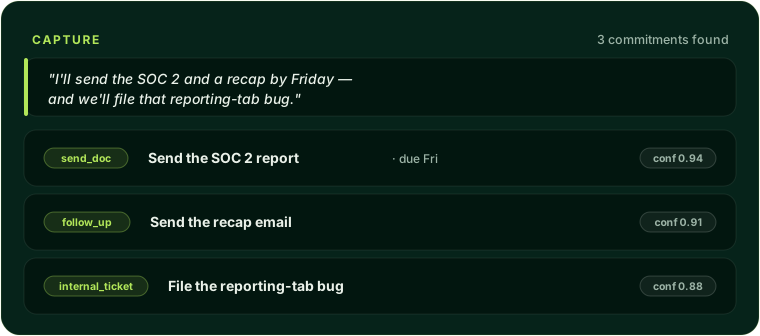
ASTRA reads call transcripts (from Zoom, Gong, or its own voice agent), email, Slack, CRM records, and internal documents, and extracts every commitment a rep made, send a document, follow up, schedule a meeting, update the CRM, loop someone in, or file a ticket, each with the source quote, who said it, a deadline, a risk level, and a confidence score. Paste a transcript into the Capture console and it returns structured next-steps; process a recorded call and it auto-drafts the entire multi-step plan within seconds. Commitments are not generic "tasks": they follow a locked, GTM-specific taxonomy where each type carries its own required fields and validation, so what was promised is always clear and never buried in notes.
02
The Review Console: brief first, then plan
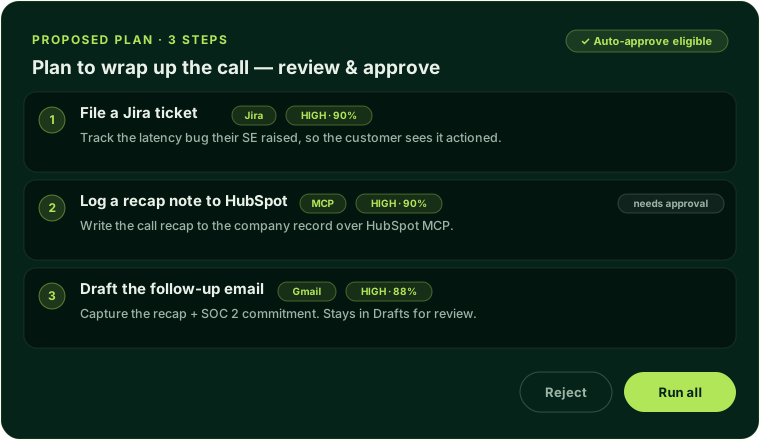
Everything happens in one account workspace. Brief mode answers natural-language questions about an account with grounded, cited answers, every claim links to the Salesforce, Jira, PostHog, or Slack data behind it, and Brief mode can never trigger a write. Plan mode drafts multi-step follow-through where each step carries its own confidence score and approval gate, and you approve, edit, reject, or run the batch in one pass. A right-hand rail shows live account context, open opportunities and ARR, product usage, open tickets, recent Slack activity, while you work, and a stale account greets you with an auto-brief of what changed since your last visit. A cross-account command search answers questions across your whole book ("who dropped SOC 2 this quarter?", "rank by days silent"), and an account timeline records every commitment, approval, execution, and outcome in order.
03
Execute: drafts become real actions, safely
Approved steps execute in the rep's own session, attributed to the rep rather than a service account, across Salesforce, HubSpot, Jira, Gmail, Slack, and Calendar. Before anything runs, preflight checks confirm required fields are present and resolve recipients, routing anything incomplete to a "needs review" queue instead of failing mid-run. After a write succeeds, ASTRA reads the record back to confirm the value actually persisted, and honestly marks a step "unverified" when it cannot confirm, rather than claiming success. Transient failures retry with backoff, every successful write records its own inverse so a multi-step plan can be cleanly rolled back, and an idempotency lock means a double-click can never send a duplicate. If a CRM's API is down, execution falls back through its modern protocol connection to in-browser automation rather than failing the whole plan.
04
Integrations: every tool the rep works in
ASTRA's differentiator is breadth, it updates every tool the rep works in, not just the CRM. It reads and writes Salesforce (opportunities, notes, activities, with field names validated against your real schema), HubSpot (deals, notes, plus full natural-language CRM control through HubSpot's MCP server, always behind human approval), files Jira tickets, sends or drafts Gmail (draft-by-default, so a follow-up can be reviewed before it reaches a customer), posts to Slack with one-click async approvals, pulls product usage from PostHog, and schedules meetings on the calendar. Every connection uses per-organization OAuth or token credentials with automatic refresh, so keys never sit in code and a rotated token just keeps working.
05
Govern: decide what is allowed to run on its own
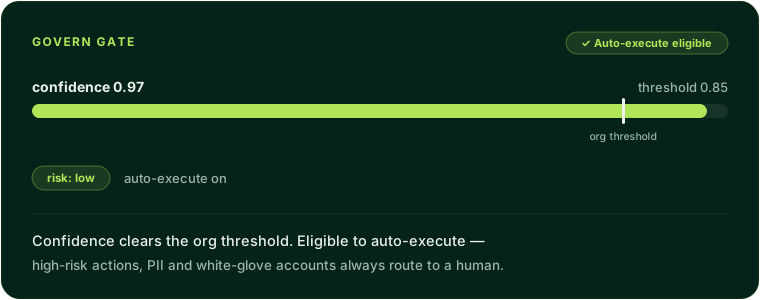
A per-organization policy engine gates every action, human- or agent-proposed, before it runs, weighing risk, an earned trust score, model confidence, and admin toggles. Teams set the confidence threshold above which routine, low-risk writes auto-execute, override it per tool (a delete always needs a human; a Slack post can fly), and mark white-glove accounts where every action always requires approval, the kind of approval and permission model an agent needs before it touches a system of record. Guardrails block, require, or filter steps by policy, block certain domains, require approval over a spend threshold, reject flagged keywords, and can run in dry-run mode to observe impact before they are armed. A daily step cap and an instant execution pause act as a budget and a kill switch, per-tool rate limits protect connected systems, writes through the natural-language CRM are always human-gated, and a cross-tenant guard makes it impossible to execute another organization's commitment. (A hard wall that automatically blocks auto-execution on PII, contracts, and financial terms is on the near-term roadmap.)
06
Audit: prove what happened
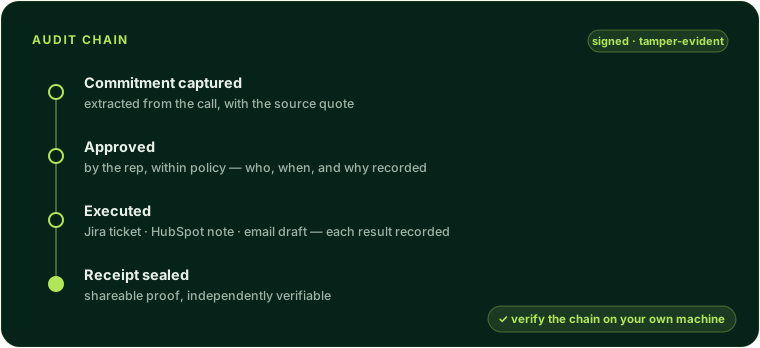
Every captured commitment, approval, rejection, execution, and policy decision lands in a tamper-evident, signed, append-only audit trail, who committed what, who approved it, whether it executed, and the result. Completed plans produce shareable, expiring execution receipts you can hand a customer as proof, and an independent verifier lets your own team confirm the chain's integrity on their own machine, detecting even a single-bit change. Decisions and outcomes are also a queryable history, so managers can audit who is approving what and why commitments fail.
07
Earned autonomy: trust the system earns, not trust you grant
Autonomy is earned, not switched on. ASTRA computes a trust score for each commitment type and risk level nightly from real approval rates and execution outcomes, and an agent ladder shows exactly where each type stands, draft-only, then act-and-notify, then bounded auto-execute, and the precise evidence needed to unlock the next rung. Shadow mode runs the auto-execute gate silently while reps keep approving by hand, then reports the agreement rate, so a team can prove autonomy matches human judgment before turning it on. Extraction quality improves the same way: reviewer corrections generate calibration suggestions an admin approves, so the system learns your organization's specific patterns over time.
08
AI built for revenue work
Brief answers are grounded and cited by design, any claim the agent cannot back to real data is flagged rather than presented as fact. Before a plan reaches you it is validated: every tool must exist, every input must pass its schema, and any CRM record ID must trace to a real lookup earlier in the same conversation, so plans do not fail on hallucinated IDs downstream. ASTRA routes across multiple model providers with automatic failover on outages, supports bring-your-own LLM keys for organizations that require model sovereignty, and lets you overlay your own tone and rules org-wide or per account. A standing security boundary treats every transcript, CRM field, and tool output as untrusted, so instructions hidden in data cannot hijack the agent.
09
GTM agents that earn their lane
Beyond ad-hoc plans, ASTRA runs role-specific agents, each scoped to its own job and tool set. A Hunter researches target accounts and drafts signal-backed opening outreach; a Solution Engineer triages technical questions into the right ticket, doc, or internal loop-in; a Customer Success Manager watches renewals, ARR, and usage to flag at-risk accounts and propose check-ins; and a Farming agent finds the one expansion vector per account and proposes the next move. Each persona can only use a curated allowlist of tools, a prospecting agent cannot touch product analytics, a CSM cannot file engineering tickets, and every one starts fully human-gated, ramping toward autonomy only as it earns trust.
10
The Chrome extension and voice
A Chrome extension runs approved plans directly inside live Salesforce and HubSpot pages, clicking, typing, waiting for the page to settle, and verifying each step, so reps never leave their CRM. Plans are cryptographically signed before they reach the extension, which rejects anything forged or tampered and only runs against approved CRM hosts. It interacts with complex Lightning and HubSpot components using genuine OS-level events and finds each element by trying the most stable signals first, falling back to matching visible text, so plans survive CRM redesigns; when a selector starts to drift, the system proposes a more durable replacement for an admin to approve. And reps can drive the CRM by voice during a call, "update the stage to Closed Won", with a confirm-before-commit step on sensitive actions.
11
Settings and administration
Everything is self-serve, with no engineering cycles. Admins add and role teammates (individually or by bulk import) without a redeploy, preview the workspace exactly as another role would see it, and monitor every connector's health with one-click reconnects. Notifications route each commitment event to Slack or email at the cadence you choose. A skills library lets you upload, version, and publish the playbooks agents run, with self-healing proposals surfaced when a step's selector breaks in production. A company knowledge base connects Guru, Highspot, Seismic, or GTM Buddy, or ingests your own PDFs and docs, so the agent grounds answers in your playbooks and pricing. And execution policy, auto-execute thresholds, guardrails, and schema caches are all tunable from one control plane.
12
Security and data sovereignty
Every record is partitioned by organization and enforced at every layer, so one customer's call data is invisible to others. Each organization gets its own encrypted signing secret for the audit trail, rotatable on demand, and can route extraction and planning through its own LLM keys, stored encrypted and isolated so concurrent requests never cross tenants. Connector credentials are encrypted with health monitoring, and retention is configurable with automatic, logged purges to meet data-residency and right-to-be-forgotten requirements.
13
Who it is for
ASTRA is built for technical, customer-facing revenue teams, CSMs, Solution Engineers, TAMs, Account Managers, and the AEs alongside them, at mid-market and enterprise B2B SaaS companies where the promises made on calls are too important and too numerous to track by hand. It is especially suited to regulated teams in healthcare, fintech, and security that want to put automation on revenue workflows but need a hard governance wall and court-admissible proof of every action. If your team makes promises on calls and updates live across a CRM, a ticketing system, email, and Slack, ASTRA captures every one, executes it in the tools you already use, and proves it happened.
FAQ
Does ASTRA auto-execute changes to my CRM?
Only if you let it. By default every write waits for human approval. Teams can enable auto-execution per commitment type once the system has earned a trust score above their threshold, and high-risk actions and white-glove accounts always require a person.
Does it replace my CRM or my other tools?
No. ASTRA sits above your existing stack as an operator surface, it reads from and writes to Salesforce, HubSpot, Jira, Gmail, Slack, and PostHog, and leaves the systems of record in place.
How do I know what it actually did?
Every action lands in a signed, append-only audit chain with a shareable receipt, and you can verify the chain integrity yourself, nothing relies on trusting the vendor.
Which teams get value first?
Customer Success, Solution Engineering, and TAM teams usually see it first, because they make the most cross-tool commitments per call and feel the cost of dropped follow-through the most.
Want the GTM engineer without the headcount?
Apply for a subscription slot and get unlimited GTM engineering requests handled at a fixed monthly rate.
Apply for a slot